
Rankings Crypto wallets Tether Wallet
Software wallet reviewBy Peter LangUpdated
Tether Wallet Review 2026
Tether Wallet is the stablecoin issuer's own self-custody app, built around USDT, gold, and Bitcoin, with easy-to-read @tether.me usernames.
- Price
- Free
- Swap fee
- In the rate
- Bitcoin / Solana
- Yes / No
- Code
- Partly public
Our verdict in 30 seconds
Tether Wallet launched in April 2026 and has a narrow focus: USD₮, USA₮, XAU₮, and Bitcoin, with fees paid in the token you send. It is self-custodial and signs transactions on your phone, but it requires an email account, offers cloud backup split between Tether and your own cloud storage, and does not support hardware wallets. Commentators have raised privacy concerns about its Lightning route. Also, because Tether issues USDT, it can still freeze the token even when held in a self-custody wallet. Use it for simple stablecoin transfers, not as a general-purpose wallet.
Tether Wallet fees and key facts
| Maker | Tether Operations, S.A. de C.V. |
|---|---|
| Price | Free to download; Tether charges no app fee, but you pay network fees in the token you send. |
| Swap fee | No app fee; network fees are paid in the token you send |
| Coins and chains | USD₮, USA₮, XAU₮, and Bitcoin (on-chain and Lightning) |
| Apps | Mobile app (iOS, Android, and APK) |
| Works on | iOS and Android, with an APK download |
| Code | Wallet Development Kit is open source; whether the app itself is fully open is not verified |
| Key storage | None: transactions are signed on your phone |
How we scored it
Weighted average of five editorial ratings. See how we score.
What we like, and what we don't
Strengths
- No app fee, with network fees paid in the token you send
- Readable @tether.me usernames instead of long addresses
- Self-custodial, with on-device signing and a 12-word manual backup option
- Bitcoin available on-chain and over Lightning in the same app
Weak spots
- Very limited asset selection: four tokens across a few networks
- Cloud backup stores encrypted data on Tether's servers
- Tether can still freeze USDT, even in a self-custody wallet
- No hardware wallet support, browser extension, or desktop app
- Too new to have a long track record or a public audit that we could find
Who should use the Tether Wallet?
Great fit
- USDT holders who send stablecoins
- Beginners who prefer not to use long addresses
- People who want Bitcoin and gold tokens in one app
Look elsewhere if
- Anyone who needs a wide range of coins or dApps
- Privacy-focused Bitcoin users
- People who want a hardware wallet
- Anyone concerned about USDT being frozen
How much does the Tether Wallet cost?
Tether Wallet is free to download. Free to download; Tether charges no app fee, but you pay network fees in the token you send. In-app swaps: no app fee; network fees are paid in the token you send.
In-depth review
Tether Wallet: our full analysis
How we reviewed it
This is an analyst review, not a laboratory test. It draws on Tether's official site and FAQ, the App Store listing, launch coverage from The Block and Cointelegraph, two independent write-ups from Coincub and CoinPro, and Tether's two official videos. Neither independent write-up provides a numerical score, so we present them without one.
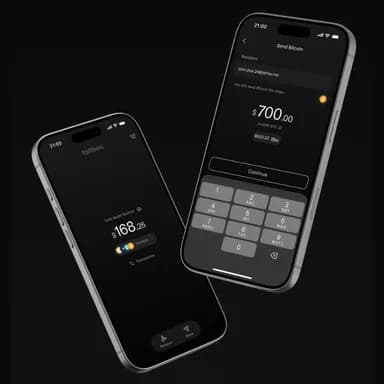
Tether Wallet is new: it launched on April 14, 2026. As a result, it has a limited track record, and some of the information in this review is based on Tether's own statements. The images in this review are marketing images from Tether, not our own captures.
Tether Wallet vs. MetaMask and Trust Wallet
MetaMask and Trust Wallet are general-purpose wallets that support many blockchains. Tether Wallet trades broad compatibility for a much shorter list of assets and simpler transfers.
| Feature | Tether Wallet | MetaMask | Trust Wallet |
|---|---|---|---|
| Price | Free | Free | Free |
| Platforms | iOS, Android, APK | Chrome, Firefox, Brave, Edge, iOS, Android | iOS, Android, Chrome, Brave |
| Browser extension | No | Yes | Yes |
| Assets | USD₮, USA₮, XAU₮, Bitcoin | Ethereum and EVM chains, Solana, Bitcoin, TRON | 100+ blockchains and millions of tokens |
| Swap fee | No app fee; network fees paid in the sent token | 0.875%, plus network fees | Not itemized; CryptoTicker lists 0.7% |
| Source code | WDK open source; app not verified | Public on GitHub; license not verified | Wallet Core public; app not fully open source |
Analyst take: Choose Tether Wallet for simple USDT and Bitcoin transfers. Choose MetaMask or Trust Wallet if you need more blockchains, dApps, or a browser extension.
Design and platforms
Tether Wallet is a mobile app for iOS and Android, with an APK available from the official site. It has no desktop app or browser extension.
Setup follows an account-style process: you enter an email address, set a password, and choose a @tether.me username. You can then send funds to that username instead of using a long address. According to Tether, this works with other Tether Wallet users and other Lightning wallets. For other wallets and exchanges, you use a standard address or QR code.
How the security works
Tether says the wallet is created on your phone, each transaction is signed on the phone, and the recovery phrase is never sent to its servers in readable form. It also says that Tether cannot access or move your funds.
There are two backup options. The recommended cloud backup encrypts your wallet data on your device, stores the encrypted data on Tether's servers, and keeps the encryption key in your iCloud or Google account. The manual option is a 12-word phrase that you write down yourself. If you lose both, Tether says nobody can recover the wallet.
We could not find a public security audit of the app, nor could we verify that the app itself is open source. Tether describes its Wallet Development Kit, on which the app is built, as open source.
Analyst take: The design looks sound on paper, but it relies on Tether's own description. Treat it as a new wallet and keep only amounts you can afford to lose in it until it has a longer track record.
Privacy concerns
CoinPro reports that a commentator demonstrated, one day after launch, that it was possible to inspect Lightning activity linked to the wallet. Another community write-up says Bitcoin Lightning transactions in the app run over Spark and that a user's Spark address can be derived from their username, making balances and transaction history visible on a public explorer.
These are claims made by commentators. Tether has not confirmed them in the sources we reviewed, so we flag them rather than treat them as established facts. The App Store listing also identifies some data as being used to track you, and the wallet collects an email address.
Analyst take: If privacy matters to you, assume that a @tether.me username could be linked to your Bitcoin activity until Tether clarifies the issue.
The USDT freeze risk
Coincub and CoinPro both point out that, although the wallet is self-custodial, Tether can still block USDT because of how the token works. The official wallet page does not discuss this risk.
This is not specific to Tether Wallet: it applies to USDT held in any wallet. However, it matters more here because the app is built almost entirely around USDT.
Assets and networks
Tether lists four supported assets: USD₮, USA₮, XAU₮, and Bitcoin. USD₮ and XAU₮ run on Ethereum, Polygon, Plasma, and Arbitrum. USA₮ runs on Ethereum only. Bitcoin is available on-chain and over Lightning, including support for BOLT11 invoices and LNURL.
The App Store listing also mentions beta support for USDT on Tron. We found no Solana support in the sources we reviewed, and one third-party article that lists Solana conflicts with Tether's own pages.
Fees
Tether says the wallet charges no fees for sending or receiving. Network fees still apply. They go to the network and a Paymaster, not to Tether, and are paid in the token you send. This means you do not need ETH or another gas token.
The app displays the fee before you confirm a transaction. With Send Max, the fee is deducted from the amount, so the recipient receives slightly less than your full balance. We found no stated in-app swap fee.
Watch: Tether Wallet official videos
From the maker's own YouTube channel. The video loads only when you press play.
Tether Wallet photos
Tether Wallet full specifications
| Price | Free to download; network fees apply |
|---|---|
| Developer | Tether Operations, S.A. de C.V. |
| Platforms | iOS, Android, APK |
| Launched | April 14, 2026 |
| Assets | USD₮, USA₮, XAU₮, Bitcoin |
| Networks | Ethereum, Polygon, Plasma, Arbitrum, Bitcoin, Lightning |
| Fees | No app fee; network fees paid in the sent token |
| Key storage | On your device; signing is performed locally |
| Hardware wallets | Not mentioned |
| Source code | WDK open source; app not verified |
| Backup | Cloud backup or 12-word phrase |
| Account | Email login and @tether.me username |
What other reviewers found
Independent reviews we read for this analysis, in our own words. Their scores use their own methods.
Coincub presents the wallet as the issuer becoming the app and praises its readable @tether.me handles. It also notes that Tether can still block USDT. The review does not provide a numerical score.
CoinPro describes the wallet as promising but reports expert warnings about privacy on the Lightning route. It also reiterates that Tether can block USDT. The privacy claims come from commentators, not from Tether.
This is a launch news report, not a review. It describes the limited asset selection, human-readable transfers, and on-device signing. It is useful for understanding what Tether announced, but not for assessing the app's performance.
Bottom line: should you buy the Tether Wallet?
Buy it if
- You mainly hold or send USDT, gold tokens, or Bitcoin.
- You want readable usernames and fees paid in the token you send.
- You are comfortable using a new app from the issuer and keeping balances modest.
Skip it if
- You need a wide range of coins, dApps, a browser extension, or a desktop app.
- You want a hardware wallet or a verified open-source app.
- Bitcoin privacy matters to you.
- You are concerned that the issuer could freeze your USDT.
If you use Tether Wallet, write down your 12-word phrase and store it offline, even if you enable cloud backup. Never share it with anyone claiming to be Tether support, and check the fee on the confirmation screen before sending.
Compare it with the rest in our crypto wallet ranking.
Features
| Public source code | Not confirmed |
|---|---|
| Works with a hardware wallet | No |
| Transaction preview or scam warnings | Not confirmed |
| Browser extension | No |
| Desktop app | No |
| Bitcoin | Yes |
| Solana | No |
“Not confirmed” means the maker's pages did not state it clearly when we checked.
Is the Tether Wallet safe?
- Tether says the wallet is created on your device and that transactions are signed there. It also says Tether cannot move your funds. This is Tether's own description; we found no public audit of the app.
- The recommended cloud backup stores your encrypted wallet data on Tether's servers and the encryption key in your iCloud or Google account. Both parts are needed for restoration and are combined only on your device. You can skip this option and back up the 12-word phrase yourself.
- The wallet uses email login and a username. Tether says it will never ask for your recovery phrase, and you should never enter it on any website.
- Self-custody does not prevent an issuer from freezing its own token. Coincub and CoinPro both say Tether can block USDT, but the official page does not address this risk.
Tether Wallet alternatives
- Exodus6.7Compare
Free · A polished desktop and mobile wallet with built-in swaps
- Trust Wallet6.9Compare
Free · A free mobile-first wallet for 100+ blockchains
- Phantom7.1Compare
Free · The leading Solana wallet, also for Bitcoin, Ethereum and Base


More comparisons: Tether Wallet vs Rabby Wallet · Tether Wallet vs MetaMask · Tether Wallet vs Phantom · Tether Wallet vs Trust Wallet · Tether Wallet vs Exodus
Tether Wallet FAQ
- Is Tether Wallet safe?
- Tether describes it as self-custodial, with keys created and used on your phone. We found no public audit, and the app is new, so keep balances modest. USDT can still be frozen by its issuer, regardless of which wallet you use.
- Does Tether Wallet charge fees?
- Tether says it charges no fees for sending or receiving. You still pay a network fee in the token you send, and the app displays it before you confirm.
- Can Tether freeze my USDT in Tether Wallet?
- Coincub and CoinPro say yes. Tether can block USDT because of how the token works, even when it is held in a self-custody wallet. The official page does not address this issue.
- What coins does Tether Wallet support?
- It supports USD₮, USA₮, XAU₮, and Bitcoin. USD₮ and XAU₮ run on Ethereum, Polygon, Plasma, and Arbitrum; USA₮ runs on Ethereum; and Bitcoin is available on-chain and over Lightning. The App Store listing also mentions beta support for USDT on Tron.
- How do I back up Tether Wallet?
- You can use cloud backup, which stores encrypted data on Tether's servers and the encryption key in your iCloud or Google account, or write down the 12-word phrase yourself. Tether says nobody can recover the wallet if you lose both.
- Does Tether Wallet need an account?
- It uses an email login and a @tether.me username. Your email address is also used to restore a cloud backup on a new phone.
- Is Tether Wallet private?
- Commentators say the Lightning route runs over Spark and can expose a username's activity. Tether has not confirmed this in the sources we reviewed, so its privacy protections remain unverified.
- Does Tether Wallet support a hardware wallet or desktop?
- We found no such support. Tether Wallet is a mobile app for iOS and Android, with an APK download option, and no hardware wallet support is mentioned.
- Is the Tether Wallet safe?
- Tether Wallet is a software (hot) wallet: your keys are encrypted on your phone or computer, so that device's security matters most. For larger balances, connect a hardware wallet.
- What are the best Tether Wallet alternatives?
- On our scores, the closest software wallets are Exodus (6.7/10, best for beginners who want a desktop app), Trust Wallet (6.9/10, best for holding many chains on a phone), Phantom (7.1/10, best for solana users).
Sources
- Tether Wallet official site
- Tether Wallet on the App Store
- Coincub: Inside the Tether Wallet
- CoinPro: Tether Wallet review
- The Block: Tether launches self-custodial wallet
- Cointelegraph: Tether launches tether.wallet
- Stacker News: user write-up on Spark and privacy
- Tether on YouTube: TETHER WALLET | The People's Wallet
- Tether on YouTube: Jonathan Dunne on WDK
Facts checked November 25, 2026. Prices, supported coins and features change, so confirm with Tether Operations, S.A. de C.V. before you buy. Nothing here is financial advice.